Data analytics internship
Gameonix Esports & Gaming
Geekglory Technologies Pvt. Ltd.
I build WhatsApp booking systems, custom business dashboards and connected workflows that simplify your daily work.

Geekglory Technologies Pvt. Ltd.
Data Analytics with AI
Connect the tools you use, simplify repetitive tasks, and give your customers a smoother experience.
Turn your business process into a custom application—with dashboards, booking systems and the integrations your team needs.
Help customers find available slots, book appointments, cancel or reschedule through a conversational booking experience.
Answer common questions, collect customer details and guide enquiries to the next step through AI-powered conversations.
Connect n8n, APIs, spreadsheets and CRM tools to keep information moving and reduce repetitive manual work.
Get professional email on your own domain, such as info@yourcompany.com, with account setup and DNS configuration.
AgencyFlow is my clinic management and appointment booking SaaS, bringing WhatsApp bookings, doctor schedules and staff attendance into one connected workspace.
A connected workspace for daily clinic operations. Patients book, reschedule and cancel through WhatsApp, while the clinic manages appointments, doctor schedules, staff records and monthly attendance. n8n connects the conversation to the application’s APIs.
Handling appointments across chat messages and separate records makes it harder to keep availability and bookings aligned.
A WhatsApp conversation passes through n8n to AgencyFlow’s API, where schedule and availability checks support the booking workflow.
Start the booking conversation on WhatsApp.
The workflow requests eligible appointment slots.
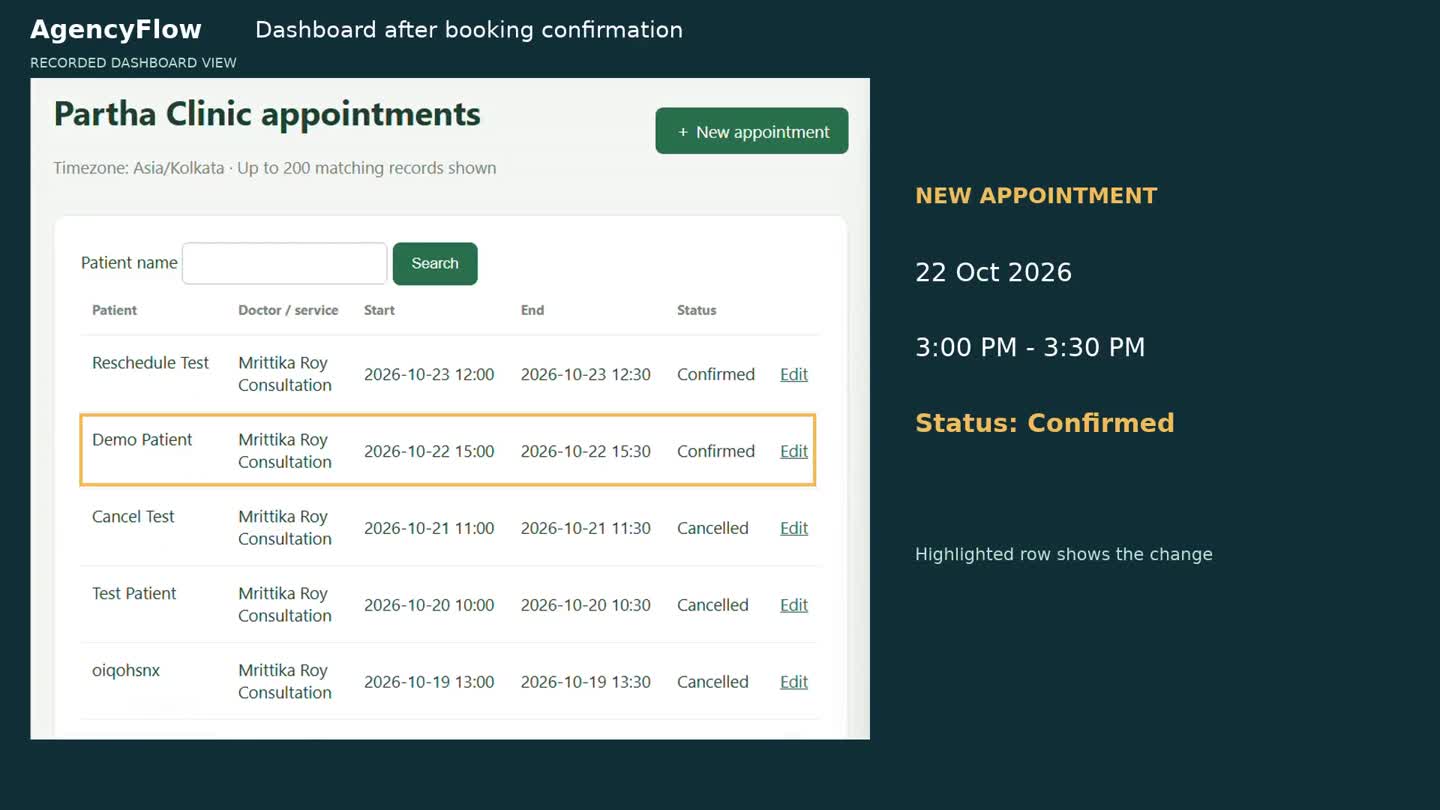
Appointment details reach the clinic dashboard.
A four-minute recorded walkthrough of WhatsApp booking, rescheduling, cancellation and manual staff booking.
From patient booking to daily clinic operations: appointment management, doctor schedules, staff records and attendance reporting. The video above covers booking workflows; the newer attendance features are described below.
Guide patients through doctor selection, date and available time, patient details and final confirmation—all within the booking conversation.
Offer 30-minute appointment slots using clinic working hours, doctor availability, holiday rules and the clinic’s timezone.
Review appointment details before saving, then return the patient, doctor, date, time and appointment ID in the conversation.
Help patients identify their existing appointment and choose the booking they want to manage.
Check availability for a new date and time, review the proposed change and confirm the updated appointment.
Request explicit confirmation before cancelling, update the appointment status and send the result back to the patient.
Keep patient, doctor or service, appointment start and end times, and booking status together in the clinic workspace.
Let clinic staff create appointments directly, search by patient name and open existing records to manage booking details.
Manage doctor and service records, clinic working hours, holidays and timezone settings from the application.
Validate future appointment times, schedule rules and overlapping bookings. Handle duplicate API requests in the booking workflow.
Track Confirmed, Completed, Cancelled and No-show appointments to keep the clinic’s booking records organized.
Connect WhatsApp conversations with application endpoints for availability, booking, cancellation and rescheduling.
Create and edit staff profiles with name, role, joining date, end date and active or inactive status, while retaining attendance history.
Mark Present, Late, Absent, Leave or Weekly Off. Add optional same-day check-in and check-out times, plus a note.
Filter by month and staff member. See total attended days (Present + Late), with Absent, Leave, Weekly Off and Not marked shown separately.
Open a staff member’s daily attendance details, update an entry and export monthly summaries with daily details for a selected staff member.
Reject future dates and entries outside employment dates. Validate check-out times; saving the same staff member and date updates the existing record.
Scope staff and attendance access to the authorized clinic. Record staff changes, attendance updates and attendance CSV exports in the activity history.
Attendance reports count elapsed employment days only. Unrecorded days remain Not marked; Weekly Off is entered explicitly. Optional check-in/out supports same-day shifts.
Supporting administration and operations developed alongside the booking and staff management workflows. These areas are not all shown in the recorded demo.
Clinic settings, doctor and service records, working hours and holiday configuration.
Clinic memberships, owner invitations and login verification to support scoped clinic access.
Activity history and an outbound-reply queue for monitoring application actions and message processing.
CSV appointment export and backup workflows developed alongside the application.
I’m Partha Sarothi Roy, a CSE–AI student working with AI automation, custom web applications and business email infrastructure.
My work brings application development, backend APIs, automation integration and deployment together. AgencyFlow shows how these pieces can support a complete appointment booking workflow.
Tell me about your business and what you want to improve. Reach out directly or connect with me online.
partha.sarothi681@gmail.comGmail opens in a new tab. Sign in if prompted, or copy the address to use any email service.
WhatsApp · +880 1306 867416